Build Your First Agent
In this quickstart guide, you will learn to Create a new Agent.
Agent Development Simplified
- Build AI Agents with No-code
- Customize & Extend to complete your use case.
- Use AI Agents in workflows or as chat.
- While given below are concise example steps, please read thru details in these pages:
- Chapter 4 : How To Use AI Data Solutions
- One of Chapter 5 : AI Case Studies , e.g. SuiteCRM
- Also refer to below, as needed:
- Tutorial 1 : Build Your First App
- Tutorial 8 : EasyManage AI → Chapters 6-10
Building Steps and Resources
We will be building CRM AI Agents with context from CRM database and sales documents.
- Build AI Agents and AI Workflows with pattern chaining.
- Make AI-Ready Data available.
- Optionally Provision RAG Context (Sales Documents).
- Use Tools and Resources
- EasyManage On-Premise Edition
- Your CRM database accessible via JDBC
- For some quick assistance, AI Tool like Cursor or Copilot in VS Code
- Model - LLM Provider and API Key
- On-premise host: Win 11, RAM 16GB, HD 256GB.
- With Docker Desktop, Java 17 or higher.
Setup EasyManage On-Premise
- Follow and Setup Tutorial 1 : EasyManage On-Premise
- Apply Change to Use EasyManage Id
CRMApp01, Follow Docker Readme. - Sign-Up/Sign-In to EasyManage (http://localhost:8080/em)
- Apply Change to Use EasyManage Id
AI-Ready Data
Make AI-Ready Data available with EasyManage building.
Process Tables and Views
- Steps in EasyManage Builder Studio:
- Sign-Up/Use EasyManage Id: CRMApp01
- Setup Db Source
- Import Tables
- Download Table Schema, e.g.
TableSchemaDnld_CRMApp01.sql
For Process Tables and Views, Use any AI Tools Editors like:
- VS Code with Copilot chat
- Cursor
Use AI Tools to generate final SQL script.
- Giving as context
TableSchemaDnld_CRMApp01.sql, Ask AI model - Sensitive data columns filtering:
Study columns and mark columns , put comment on right side, for columns that come under:
PII (Personally Identifiable Information)
Sensitive Personal Information
Sensitive Data
Confidential Business Information
- Create singular views on each table:
create new sql script with view creation for each table,
selecting all columns,
except those annotated for sensitive data with '-- [ ]',
also add '_evw' suffix to view name
- In views script, Rename, if have, key column as
ID. Change:ID,To:ID keyId, - See example below for one final table view script from generated views script e.g.
TableSchemaDnld_CRMApp01_Views.sql:
/* View for table: Accounts */
CREATE VIEW Accounts_evw AS
SELECT
  ID keyId,
  AccountName,
  AccountDescription,
  ...
FROM Accounts;

...
- Load/Create these views in CRM database: using views script above.
Use AI Tools to Analyze table schemas for AI workflows
- Giving as context
TableSchemaDnld_CRMApp01.sql, Ask AI model - Ask AI What AI Workflows Can Implement:
study all table schema and suggest what AI workflows can be implemented based on tables
- Save response, Study it and short-list first AI Agent workflow you want to build.
Build AI Agents
- No-code Build AI Agents and AI Workflows with pattern chaining.
Build Agent MCP Packs
- Steps in EasyManage Builder Studio:
- Sign-Up/Use EasyManage Id: CRMApp
- Setup Db Source
- Import Tables: Import new views only, using search qualifier '_evw'
- Configure Project
- Select
Tables Imported xxxxfolder for build selection - Generate Code
- Download
- Next, follow steps in Chapter 10 : Agent MCP Packs
Agents & Dashboard
- Build and test generated no-code AI Agents with Agents & Dashboard.
- Follow steps in Chapter 9 : Agents & Dashboard
Use AI Chat
- Conversational AI
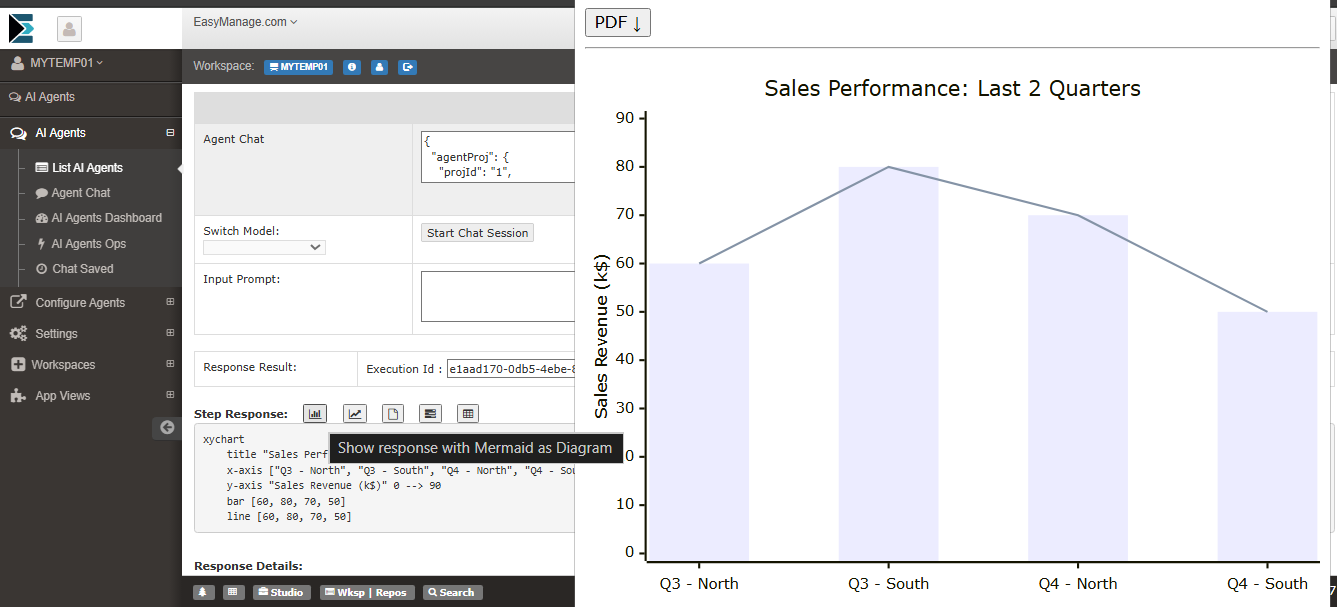
- Using AI Chat allows users to ask conversational questions about their data and get analytics.
- Use AI Chat, See Agent Chat
Run Generated Agents
Run Generated No-Code Agents.
- AI Agent Workflows as Agent Projects
- Use sample generated Agents, customize to your needs.
- See Agent Project
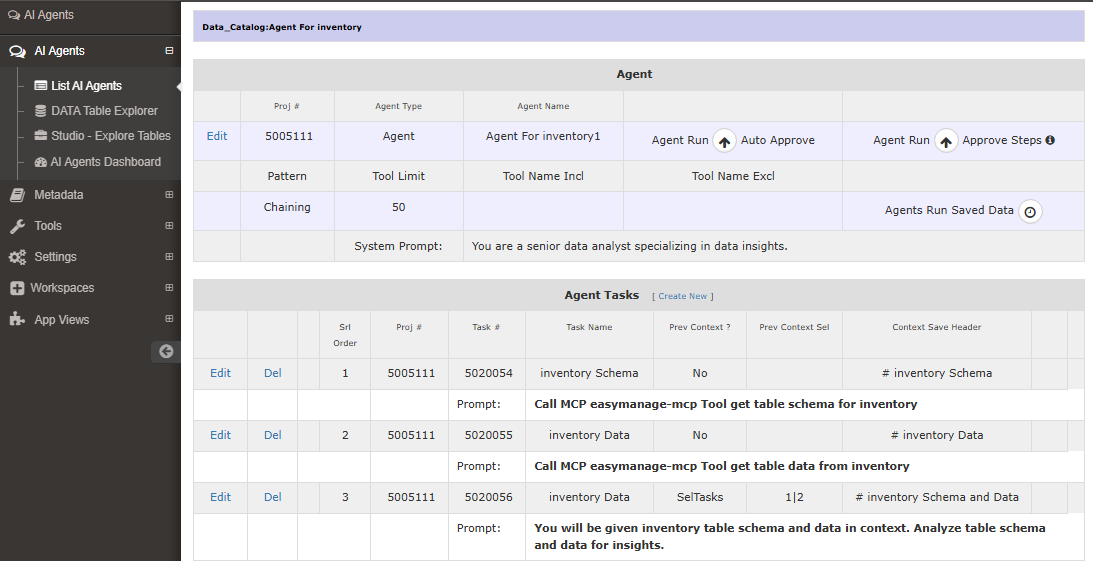
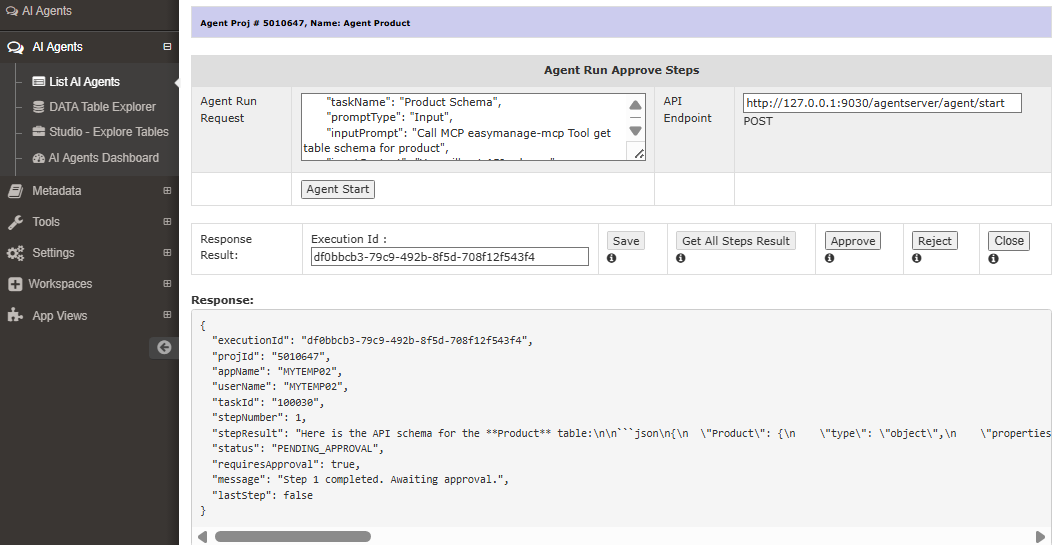
Generated No-Code Agent Projects help to jumpstart building your specific Agentic Workflows.
Build Your 1st Agent
Once familiar with How Agent Project is organized and works, you are ready to build AI Agent with No-Code.
For example during case study Section 5-3 : Case Study SuiteCRM, Para: Ask AI What AI Workflows Can Implement, below Agent Workflow is suggested.
Agent: Cross-sell / upsell recommendations

Uses: AosProductsQuotesVw joined by groupId/parentId to quotes/opps, with account segments from AccountsVw.
Outcome: Product bundling suggestions per account/opportunity.
- Similarly, Study your earlier short-listed AI Agent workflow description, and how it should be built.
- Implement the steps in workflow as AI Tasks i.e. Agent Tasks.
- Run and refine your Agent to get desired response.
Congratulations, you have built AI Agent.
Checklist For AI Agents Building
Reference Checklist & Steps For AI Agents Building to production roll-out.
See Credentials Setup for production use.
EasyManage On-Premise
- Setup EasyManage On-Premise Edition
- Import tables
- Table Schema | Download
- Table View SQL | Download
Model - LLM & AI Tool
- Provision/Setup
- Openrouter.ai API Key with Credits
- AI Tool / Editor, setup any tool for GenAI usage, e.g.:
- VS Code with Copilot
- Chatgpt
AI-Ready Data
- Process Tables and Views
- Analyze table schemas for PII, Sensitive data columns filtering
- Get Processed Tables and Views
- In EasyManage Builder
- Import Processed Table Views
- Project Configure → Project Settings - Security Configuration
- Select Your Security Method
- Generate Code, Download
- Build Agent MCP Packs, Deploy
- Configure Agent Server
- AI-Ready data available via MCP Tools
No-Code Agents
- In EasyManage Builder, Import Tables Action in last step, also creates No-Code Agents
- Agents & Dashboard
- Build and test generated no-code AI Agents
AI Chat
- AI Chat
- Use Agent Chat (Conversational AI)
Production AI Agents
- Analyze table schemas for AI workflows
- In AI Tool
- Ask AI What Top 20/30 AI Agents And Workflows Can Implement
- Short-list Phase 1 AI Agents and Workflows you want to build
- In AI Tool
- Select Phase 1 AI Agent To Implement
- e.g. "Input Items Procurement Optimization Engine"
- In AI Tool
- Ask AI: "To build AI Agent <Agent Name>, Study the table schema, and give <your database type & ver> queries for building agent"
- Verify, validate and finalize database queries
- Run each query against your database and verify
- Build intermediate Views and then get final Agent Query View.
- AI Agent Build and Roll-out
- Customize No-Code Agents to complete Use Case
- Or Create New Agent Project
- Add all your workflow tasks or queries
- Add final Agent Query Task
- Emd User Acceptance
- End Users run, test Agents and validate
- As required, Make changes to workflows and complete acceptance testing
- Production Roll-out
- Roll-out Agent to Production.
Scheduling & Integrations
As per requirement,
- Schedule AI Agent Runs using Kestra
- Integrate AI Agents in your Frontend/App with available REST interface
Credentials Setup
Set strong passwords and proper credentials for Production use.
Do NOT use default passwords for production setup.
- EasyManage On-Premise edition
- File
.env- MySQL credentials:
MYSQL_ROOT_PASSWORD,EMDB_PASSWORD
- MySQL credentials:
- File
em_dirs\warextracted\em\WEB-INF\classes\em_param1_en_US.propertiesem.db.mysql.password: same value asEMDB_PASSWORD
- File
docker-compose.ymlem_appTomcat image: Use this image for Agent Svr Security Basic Authimage: tomcat:9.0-jdk8
- File
- EasyManage Builder account passwords
- When you Sign-Up for below User Accounts (or your custom accounts)
- ADMIN, ApplicationEm, emDeveloper, ...
- Project Configure : Project Settings - Security Configuration
- Passwords for emUser and emAdmin
- When you Sign-Up for below User Accounts (or your custom accounts)
- Gnerated code Agent MCP Pack Auth
- Credentials for Db Sources
- Basic Auth credentials