Chapter 10 : Agent MCP Packs
What Are Agent MCP Packs
Agent MCP Packs refer to group of below components as one logical unit:
- AI Agents
- MCP Server
- Backend APIs
- They can be run as separate components or in a docker container.
- Agent MCP Pack Docker Containers combine the mentioned components in one container.
Note: For describing and giving instructions, we have selected/used REST API type for MCP and Backend.
Agent MCP Pack in EasyManage Builder
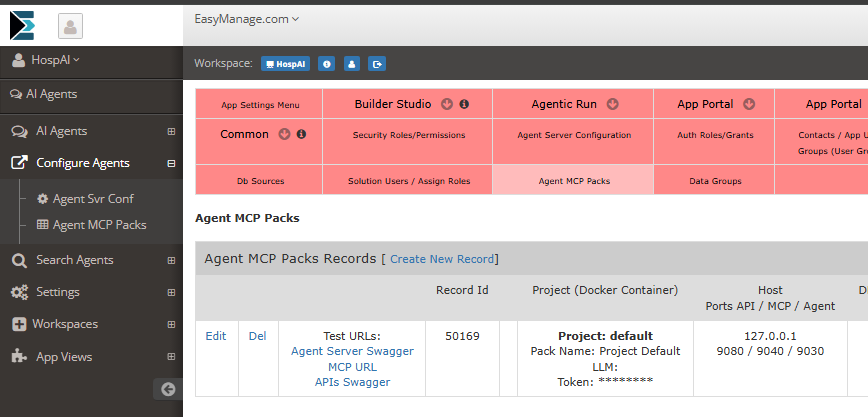
Follow Menu Links: AI Agents → Configure Agents → Agent MCP Packs
Agent MCP Pack records in EasyManage Builder app are created to re-present Agent MCP Packs deployed.
- Agent MCP Pack records in EasyManage Builder ← Agent MCP Pack docker containers | Or Agent MCP Packs separatly run.
Agent MCP Pack Security
When selected security configuration like Basic Auth or OAuth2 , you need to combine MCP Server with Agent Server.
Combine MCP Server with Agent Server
Combine MCP Server with Agent Server as one component.
How To Combine MCP Server with Agent Server
Follow these guidelines:
- MCP Server REST Combine with Agent Server
- Packaging as jar so that Agent Server can use it as dependency.
Changes to MCP Server REST
Locate Spring Java MCP Server REST project
mcp\spring-java\emmcp\app\mcprest
Edit pom.xml for mcprest
mcp\spring-java\emmcp\app\mcprest\pom.xml
Add packaging as jar:
    <groupId>com.example.emmcp</groupId>
    <artifactId>mcprest</artifactId>
    <version>1.0-SNAPSHOT</version>
    <packaging>jar</packaging>
    <name>emmcp : app : mcprest</name>
    <description>MCP REST</description>
Remove dependency:
        <dependency>
            <groupId>org.springframework.boot</groupId>
            <artifactId>spring-boot-starter-security</artifactId>
        </dependency>
Remove plugin:
    <build>
        <plugins>
            <plugin>
                <groupId>org.springframework.boot</groupId>
                <artifactId>spring-boot-maven-plugin</artifactId>
            </plugin>
        </plugins>
    </build>
- Remove/Delete Java Config File:
mcp\spring-java\emmcp\app\mcprest\src\main\java\com\example\emmcp\app\SpringSecurityConfigBasicAuth.java
- Build and install project
cd mcp\spring-java\emmcp
mvn clean install
Changes to Agent Server
Locate Spring Java Agent Server project
agent\spring-java\agentserver
Edit pom.xml
agent\spring-java\agentserver\pom.xml
Enable Combined MCP Server: Locate below block and un-comment/enable:
        <!-- withmcp

        <dependency>
            <groupId>com.example.emmcp</groupId>
            <artifactId>mcprest</artifactId>
            <version>${project.version}</version>
        </dependency>

        <dependency>
            <groupId>org.springframework.ai</groupId>
            <artifactId>spring-ai-starter-mcp-server-webmvc</artifactId>
        </dependency>

        <dependency>
            <groupId>org.springframework.boot</groupId>
            <artifactId>spring-boot-starter-webflux</artifactId>
        </dependency>

        withmcp -->
- Edit File
AgentServerApp.javaagent\spring-java\agentserver\src\main\java\com\example\agentserver\AgentServerApp.java
Add scanBasePackages as below to @SpringBootApplication:
@SpringBootApplication(scanBasePackages = {"com.example.agentserver", "com.example.emmcp"})
- Edit application.properties
agent\spring-java\agentserver\src\main\resources\application.properties
Enable Combined MCP Server: Locate below block and
- comment out **EM MCP Client** section:
    - Keeping `# EM MCP Tool Properties` part
- Enable uncomment **EM MCP Server Combined** section (Replace "#withmcp")
- Edit `em.mcp.authType=None` , Set Basic or Bearer as applicable.
- Edit `em.mcp.authToken=` , Set Token value.
# -----------------------------------------------------------------
# EM MCP Client

# STDIO Mode
#spring.ai.mcp.client.stdio.servers-configuration=mcp.json

# If SSE MCP Server (deprecated)
#spring.ai.mcp.client.sse.connections.easymanage-mcp.url=http://localhost:9040

# Streamable HTTP transport Mode
spring.ai.mcp.client.streamable-http.connections.server1.url=http://localhost:9040
spring.ai.mcp.client.streamable-http.connections.server1.endpoint=/mcp
#spring.ai.mcp.client.streamable-http.connections.server2.url=http://otherserver:8081
#spring.ai.mcp.client.streamable-http.connections.server2.endpoint=/custom-sse

spring.ai.mcp.client.type=SYNC

logging.level.io.modelcontextprotocol.client=WARN
logging.level.io.modelcontextprotocol.spec=WARN

#spring.ai.mcp.client.enabled=true
#spring.ai.mcp.client.type=SYNC
#spring.ai.mcp.client.toolcallback.enabled=true
#spring.ai.mcp.client.initialized=true
#spring.ai.mcp.client.annotation-scanner.enabled=true


# EM MCP Tool Properties

em.mcptools.toolTypeExcl=create_|update_|delete_|get_table_data_all_

## MCP Tool Groups : Tool Groups Across Hybrid Databses

em.mcptools.mcpgroupsEnabled=
#em.mcptools.mcpgroupsEnabled=true

# e.g.
#em.mcptools.mcpgroup.accounts-grp=user_profile|lifetime_value|account_master
#em.mcptools.mcpgroup.inventory-grp=dailystock|warehouses

# -----------------------------------------------------------------

#withmcp# -----------------------------------------------------------------
#withmcp# EM MCP Server Combined
#withmcp
#withmcp# Server Transport
#withmcp# ----------------------------------
#withmcp# STREAMABLE (Streamable HTTP transport)
#withmcp
#withmcpspring.ai.mcp.server.protocol=STREAMABLE
#withmcpspring.ai.mcp.server.type=SYNC
#withmcpspring.ai.mcp.server.instructions=This streamable server provides mcp tools
#withmcpspring.ai.mcp.server.tool-change-notification=true
#withmcpspring.ai.mcp.server.resource-change-notification=true
#withmcpspring.ai.mcp.server.prompt-change-notification=true
#withmcpspring.ai.mcp.server.streamable-http.mcp-endpoint=/mcp
#withmcpspring.ai.mcp.server.streamable-http.keep-alive-interval=60s
#withmcp
#withmcpspring.ai.mcp.server.name=mcprest
#withmcpspring.ai.mcp.server.version=0.0.1
#withmcp
#withmcp# Pass as arg when calling jar or define here
#withmcp# "args": ["-jar", "path/mcprest-1.0-SNAPSHOT.jar", "--em.mcp.apiUrl=restApiUrl" ]
#withmcp# e.g. em.mcp.apiUrl="http://127.0.0.1:9080/emdbrest"
#withmcpem.mcp.apiUrl=http://127.0.0.1:9080/emdbrest
#withmcpem.mcp.authType=None
#withmcpem.mcp.authToken=
#withmcp
#withmcp# -----------------------------------------------------------------
- Add
@Bean@PrimaryFor MCP Tools to populate and get all tools listing inToolCallbackProvider. - Add file:
agent\spring-java\agentserver\src\main\java\com\example\agentserver\McpToolsConfig.java
See below sample file. Uses services @Service from package com.example.emmcp from MCP Server REST project.
Sample McpToolsConfig.java
package com.example.agentserver;

import org.springframework.ai.tool.ToolCallbackProvider;
import org.springframework.ai.tool.method.MethodToolCallbackProvider;
import org.springframework.context.annotation.Configuration;
import org.springframework.context.annotation.Bean;
import org.springframework.context.annotation.Primary;

import org.springframework.context.ApplicationContext;
import org.springframework.stereotype.Service;
import org.springframework.beans.factory.config.BeanDefinition;
import org.springframework.beans.factory.support.DefaultListableBeanFactory;

import java.util.ArrayList;
import java.util.List;
import java.util.Map;

@Configuration
public class McpToolsConfig {

    @Bean
    @Primary
    public ToolCallbackProvider buildToolsAllRest(ApplicationContext applicationContext) {

        List<Object> serviceInstances = new ArrayList<>();

        if (applicationContext.getAutowireCapableBeanFactory() instanceof DefaultListableBeanFactory beanFactory) {

            String[] beanNames = beanFactory.getBeanDefinitionNames();

            for (String beanName : beanNames) {
                BeanDefinition beanDef = beanFactory.getBeanDefinition(beanName);
                String beanClassName = beanDef.getBeanClassName();

                if (beanClassName != null && beanClassName.startsWith("com.example.emmcp")) {
                    try {
                        Class<?> beanClass = Class.forName(beanClassName);
                        if (beanClass.isAnnotationPresent(org.springframework.stereotype.Service.class)) {
                            //System.out.println("Safely loading package service: " + beanName + " -> " + beanClassName);
                            serviceInstances.add(applicationContext.getBean(beanName));
                        }
                    } catch (ClassNotFoundException e) {
                        // Class might be a configuration-generated bean or dynamic proxy, ignore or log
                    }
                }
            }
        }

        return MethodToolCallbackProvider.builder()
                .toolObjects(serviceInstances.toArray())
                .build();
    }

    // If custom selection needed
    /*
    @Bean
    @Primary
    public ToolCallbackProvider buildToolsAllRest(
        com.example.emmcp.app.EmMcpRestService emMcpRestService,
        com.example.emmcp.app.InventoryRestMcpService inventoryRestMcpService,
        com.example.emmcp.app.OrdersRestMcpService ordersRestMcpService,
        com.example.emmcp.app.ProductRestMcpService productRestMcpService
        ) {
        return MethodToolCallbackProvider.builder()
        .toolObjects(
            emMcpRestService,
            inventoryRestMcpService,
            ordersRestMcpService,
            productRestMcpService
            ).build();
    }
    */

}
- Build and Run Agent Server
- Follow Agent Server Setup
- Note: Except You do not need to Build and Run MCP Server REST, as it is combined with Agent Server.
Agent MCP Pack Docker Container
Generate and Build Docker Containers for Agent MCP Packs mapped to your data sources.
Run Agent MCP Pack In Docker Container
To Build and Run In Docker Container, After code generate and Download,
Please follow steps given in README at e.g.:
Downloads\EmGenDir_MYTEMP01_WS_51247\WS_51247\README-Agent-MCP-Pack.md
e.g. Container created and run output:
EmGenDir_MYTEMP01_WS_51247\WS_51247>docker compose up -d
[+] up 4/4
 ✔ Network ws_51247_default         Created                                 0.0s
 ✔ Container ws_51247-emapi-1       Started                                 0.4s
 ✔ Container ws_51247-emmcp-1       Started                                 0.6s
 ✔ Container ws_51247-agentserver-1 Started                                 0.8s
Primary Agent MCP Pack
If you have multiple MCP Servers mapped to various data sources, Make first Container's Agent MCP Pack as Primary. Add all your MCP Servers to its AgentServer configuration to get AI-Ready data from across all your data sources.
Use Primary Agent MCP Pack's Agent Server in EasyManage Builder : AI Agents : Agent Server Configuration.
Please see Readme mentioned README-Agent-MCP-Pack.md
- Container Setup Details : You can repeat these steps for next MCP containers.
MCP Tool Groups
You can group tools from different MCP servers, across hybrid databses, into functional domain groups such as accounts-grp, inventory-grp.
Tool Groups Across Hybrid Databses
For an e-commerce app, If you have database tables in Postgres and Snowflake, lets see how to formulate MCP Tool Groups.
Agents To MCP Visibility: Agents should get exposed to tools for a specific "Group", rather than all tools from Snowflake and Postgres MCP servers.
Define your groups in application properties to map which tables or tool patterns belong to which group.
- Add to
agent\spring-java\agentserver\src\main\resources\application.properties
## MCP Tool Groups : Tool Groups Across Hybrid Databases

em.mcptools.mcpgroupsEnabled=true

em.mcptools.mcpgroup.accounts-grp=user_profile|lifetime_value|account_master
em.mcptools.mcpgroup.inventory-grp=dailystock|warehouses
Optionally, Establish a Tool Naming Convention
- Format:
[group_name]_[db]_[tool] - Examples for
accounts-grp:accounts_psql_get_user_profileaccounts_snowflake_get_lifetime_value
- Format:
Provision Agents with Specific Groups
- Account Agent: Restrict to
accounts-grp. It only sees the filtered list of tools from both databases. - Inventory Agent: Restrict to
inventory-grp.
- Account Agent: Restrict to
How to Use Tool Groups in Agents
In Agent Project, Use it via Tool Name Incl property. It has dual role to include MCP Tool Groups and then also further filter tools within those groups.
- Tool Name Incl:
accounts-grp|inventory-grp- Add all tools from
accounts-grpandinventory-grp
- Add all tools from
- Tool Name Incl:
accounts-grp|user_profile|lifetime_value- Add all tools from
accounts-grp - Keep tools matching
user_profile|lifetime_valueonly
- Add all tools from
- Tool Name Incl:
accounts-grp|user_profile|lifetime_value|inventory-grp|dailystock- Add all tools from
accounts-grp - Keep tools matching
user_profile|lifetime_valueonly - Add all tools from
inventory-grp - Keep tools matching
dailystockonly - If you want to specify tool name matching, specify tool name conditions for all tool groups included.
- Add all tools from